
Billing and payments
Choose a plan, pay by card, PayPal, Apple Pay or Google Pay, and manage or cancel your subscription at any time from Settings → Plan & billing.
Choose a plan
Open Settings → Plan & billing and choose Starter, Business or Professional. Prices are in Egyptian pounds per month. See Free trial, plans and limits.
Payment
Pay by card, PayPal, Apple Pay or Google Pay, from any country. Your plan renews every month and you can cancel at any time.
Payments are processed securely by Lemon Squeezy, our payment partner, which handles the checkout, receipts and taxes. MailHoor never sees or stores your full card number. Your plan is activated automatically as soon as the payment is confirmed.
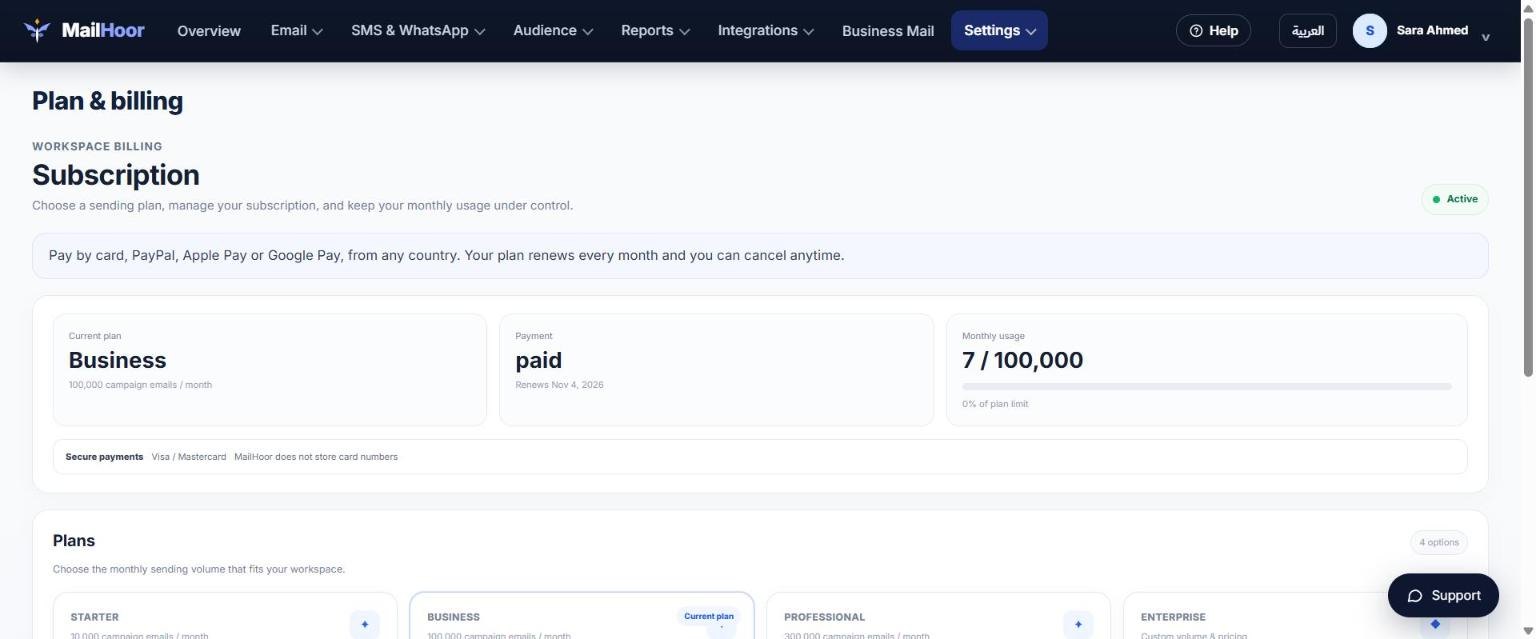
Manage your subscription
On Plan & billing, choose Manage subscription to:
- Update your card.
- Download invoices and receipts.
- Change or cancel your plan.
Upgrading
Upgrade at any time, for example when a campaign needs more volume than your plan has left. The new limits apply as soon as the payment is confirmed.
Cancelling
Cancel from Manage subscription. The subscription ends at the end of the current billing period, as shown there. Your contacts and campaigns stay in your account.
Refunds
See our refund and cancellation policy. For any billing question, email support@mailhoor.com with your workspace email.